

Soulx Podcast-1.7B
Multi-speaker podcast generation model (1.7B parameters). Generates 60+ minute dialogues with speaker switching, prosody, and paralinguistics (laughter, sighs).
Key Capabilities
- Multi-speaker dialogue - Maintains consistency across turns, handles interruptions
- Zero-shot voice cloning - 10-30 second samples replicate voices
- Paralinguistics - Laughter, sighs, throat clearing, intonation shifts
- Multi-language - English, Mandarin, Sichuanese, Henanese, Cantonese
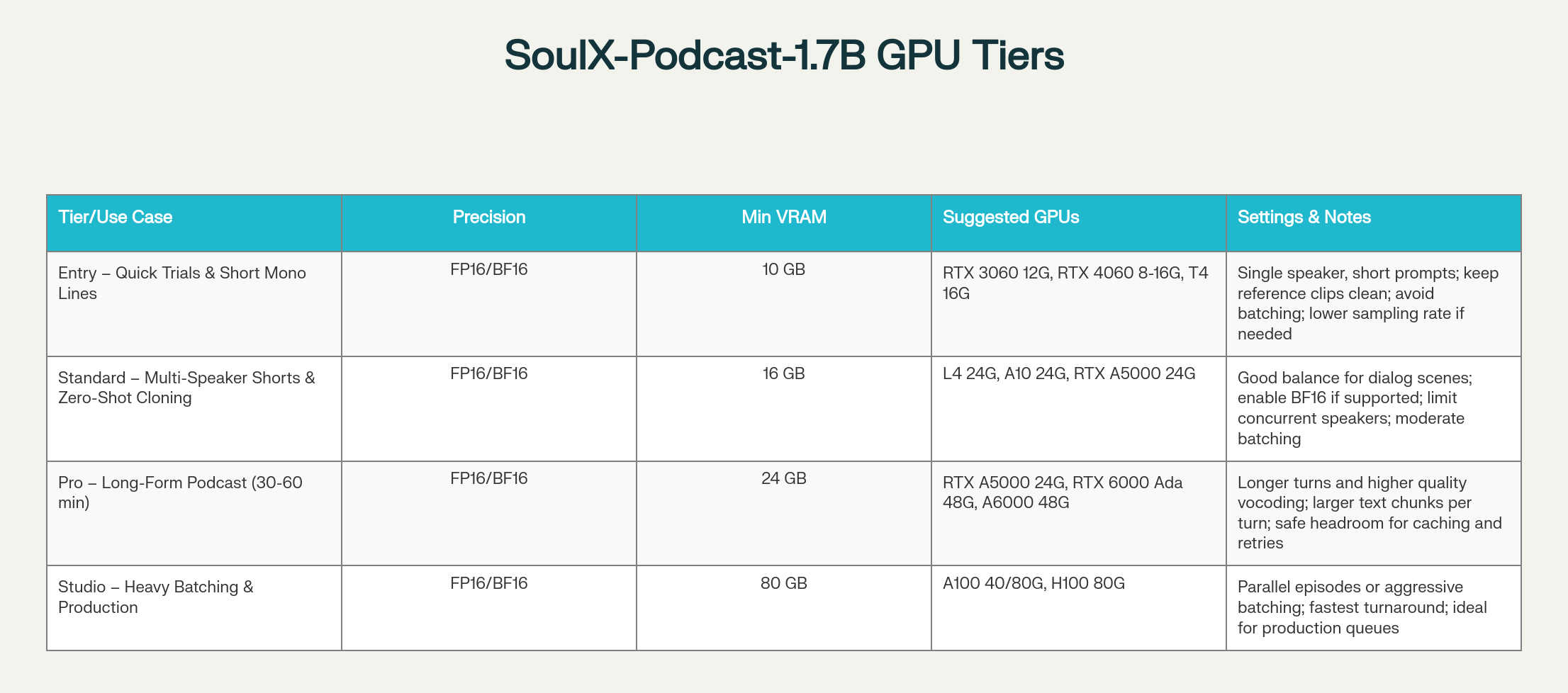
- Efficient - Runs on RTX 4060 to H100
Deploy on Spheron
- Sign up at app.spheron.ai
- Add credits (card/crypto)
- Deploy → RTX 4090 (or RTX 4060+ for testing) → Region → Ubuntu 22.04 → SSH key → Deploy
ssh -i <private-key-path> root@<your-vm-ip>New to Spheron? Getting Started | SSH Setup
Installation
Setup Environment
sudo apt update && apt install -y software-properties-common curl ca-certificates
sudo add-apt-repository -y ppa:deadsnakes/ppa
sudo apt updateInstall Python 3.11
sudo apt install -y python3.11 python3.11-venv python3.11-dev
python3.11 -m ensurepip --upgrade
python3.11 -m pip install --upgrade pip setuptools wheelInstall Miniconda
curl -O https://repo.anaconda.com/miniconda/Miniconda3-latest-Linux-x86_64.sh
bash Miniconda3-latest-Linux-x86_64.sh -b -p $HOME/miniconda3
$HOME/miniconda3/bin/conda init bash
source ~/.bashrcCreate Conda Environment
conda create -n soulxpodcast -y python=3.11Accept ToS if prompted:
conda tos accept --override-channels --channel https://repo.anaconda.com/pkgs/main
conda tos accept --override-channels --channel https://repo.anaconda.com/pkgs/rActivate Environment
conda activate soulxpodcastClone Repository
git clone https://github.com/Soul-AILab/SoulX-Podcast.git
cd SoulX-PodcastInstall Dependencies
pip install -r requirements.txt
pip install --index-url https://download.pytorch.org/whl/cu121 torch torchvision torchaudio
pip install "transformers==4.57.1" "huggingface_hub<1.0,>=0.34.0"Download Models
Base Model (English/Mandarin)
huggingface-cli download --resume-download Soul-AILab/SoulX-Podcast-1.7B \
--local-dir pretrained_models/SoulX-Podcast-1.7BDialect Model (Sichuanese/Henanese/Cantonese)
huggingface-cli download --resume-download Soul-AILab/SoulX-Podcast-1.7B-dialect \
--local-dir pretrained_models/SoulX-Podcast-1.7B-dialectTest Model
bash example/infer_dialogue.shCheck outputs/ directory for generated .wav files.
Launch WebUI
Modify webui.py
Change share=False to share=True:
# In webui.py:
share=TrueStart WebUI
Base Model:python3 webui.py --model_path pretrained_models/SoulX-Podcast-1.7Bpython3 webui.py --model_path pretrained_models/SoulX-Podcast-1.7B-dialectAccess: Open Gradio link (e.g., https://baccd06ba693323c35.gradio.live)
Troubleshooting
Audio Quality:python3 webui.py --model_path pretrained_models/SoulX-Podcast-1.7B --sample_rate 48000export PYTORCH_CUDA_ALLOC_CONF=max_split_size_mb:512export HF_HOME=/path/to/cache
huggingface-cli download --resume-download Soul-AILab/SoulX-Podcast-1.7Bpython -c "import torch; print(torch.cuda.is_available())"
nvidia-smi
pip install --index-url https://download.pytorch.org/whl/cu121 torch torchvision torchaudio# Ensure share=True in webui.py
sudo ufw allow 7860/tcp
python3 webui.py --model_path pretrained_models/SoulX-Podcast-1.7B --server_port 8080Additional Resources
- Model on HuggingFace
- GitHub Repository
- Getting Started - Spheron deployment